Version v1.23.45.2 of Freely is now available and will be rolled out to your TV. Your TV should update automatically.
You can check if you are on the latest version of the software by visiting the 'Settings' menu on Freely and selecting 'Software Updates'. Follow the steps on screen to update. For more help on how to update your software visit our FAQ
In this update
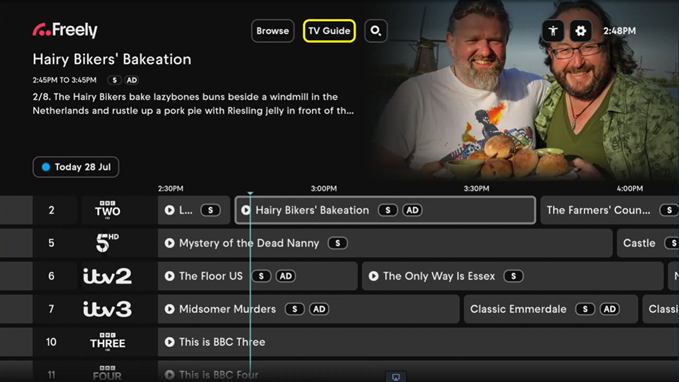
Accessibility signposting in the TV Guide
We've added a new accessibility feature to the TV Guide that makes it easier to find programmes with supported access services.
When enabled in Accessibility Settings, you'll see icons in the TV Guide showing whether a programme includes Subtitles (S), Audio Description (AD) or Sign Language (SL), helping you quickly find content that's right for you while browsing live TV Schedules.
Key Benefits of the new features
Accessibility Settings in the Browse screen
Accessibility Settings are now easier to access from the top right of the Browse screen.
Accessibility Settings toggles
Choose which access services you'd like to see signposted in the TV Guide.
Subtitles signposting
Find programmes with Subtitles (S) more easily while browsing the TV Guide.
Audio Description signposting
Quickly identify programmes that include Audio Description (AD).
Sign Language signposting
Easily spot programmes that offer Sign Language (SL) support.
How it Works
Easier access to Accessibility Settings
- Accessibility Settings can now be found in the global navigation menu at the top right of the Browse screen, making them easier to find and update whenever you need them.
- You can enable to disable which of these services (S/AD/SL) you want to see in the TV Guide
- You can enable more than one option at the same time.
Accessibility & Experience Notes
- The icon order is consistently display as (S/AD/SL).
- Once you've chosen your accessibility settings, your preferences will remain in place as you browse the TV Guide and after your TV has been put into standby or switched off and back on again.
- The feature also works when High Contrast mode is enabled.
Supporting a more accessible TV experience
- This update is part of our ongoing commitment to creating a more inclusive, accessible and personalised TV experience for everyone.
Bug fixes and improvements
- Various Bug fixes and Performance Improvements to improve overall user experience and stability of Freely.