Black Friday is the perfect excuse to upgrade your TV. But with so many offers competing for your attention, it’s hard to know which ones are worth your time.
Whether you're looking to upgrade your living room viewing, or trying to snap up a deal for a small set for the kitchen, we've got you covered.
Our Black Friday buying guide helps you shop smartly, with tips to make sure you find a great TV at a great price.
In a nutshell: your Black Friday cheat sheet:
Shop early: Black Friday is Friday 27 November 2026, and Cyber Monday is Monday 30 November, but many deals start from around 21 November.
Prices: Compare retailers and check a TV’s price history, so you know the saving is real.
Choice: Pick a size and screen type that suit your room and what you watch.
Freely: Choose a TV with Freely built in for live TV over Wi-Fi, with no aerial, dish or contract.
Explore our full range of Freely televisions
When do Black Friday sales begin?
Black Friday itself falls on Friday 27 November 2026, but many retailers now begin their discounts at the start of the month. These days, 21 November is a typical start date for Black Friday Week.
Whatever kind of products you are looking for during this time, shopping early gives you more time to compare models and prices. Some retailers have offered price-match guarantees on early deals in the past, so check the terms before you buy.
If you miss Friday itself, the Black Friday weekend usually runs until Cyber Monday on 30 November, so there’s still time to snap up a deal.
What’s the difference between Black Friday and Cyber Monday?
This year, Cyber Monday falls on Monday 30 November 2026. The key difference between the events is where you can shop: Black Friday offers deals both online and in store, while Cyber Monday deals are often online only.
Historically, Black Friday covered a wider range of goods and Cyber Monday focused on tech, but these days both events feature deals on whatever you’re looking for.
Black Friday has also grown into a week-long event, whereas Cyber Monday still typically lasts a single day.
How much discount do TVs get on Black Friday?
There’s no single figure for TVs, so treat averages with care. Some sources say discounted products in the UK are reduced by around 20–25% on average during Black Friday (PriceSpy). That covers everything from tech to kitchen appliances, not just TVs, but it’s a useful ballpark.
A big “was” price isn’t always a genuine bargain, though. Comparing a TV’s sale price with what it cost in recent months is a good way to judge whether the saving is real.
How to find the best Black Friday TV deal in 4 easy steps
A deal is only a good deal if it’s the right TV for you. Follow these four steps to narrow down your options, so you can spot the offers worth acting on as soon as they appear.
Step 1: Check the price is right
Many Black Friday prices are advertised as 'deals', and there are some great bargains to be found. Just make sure you take a look at how much you're saving before diving in.
Getting the true "was" price for something is the best way to make sure a deal is actually worth snapping up.
Take a look at a range of different sources to get a true sense of what the price used to be, rather than just the one site offering a deal on Black Friday.
The good news? Quality Freely TVs are available at all price points.
Our Freely televisions page shows prices from a variety of different retailers, so checking out the latest deals is made easy.
Step 2: Choose the right size
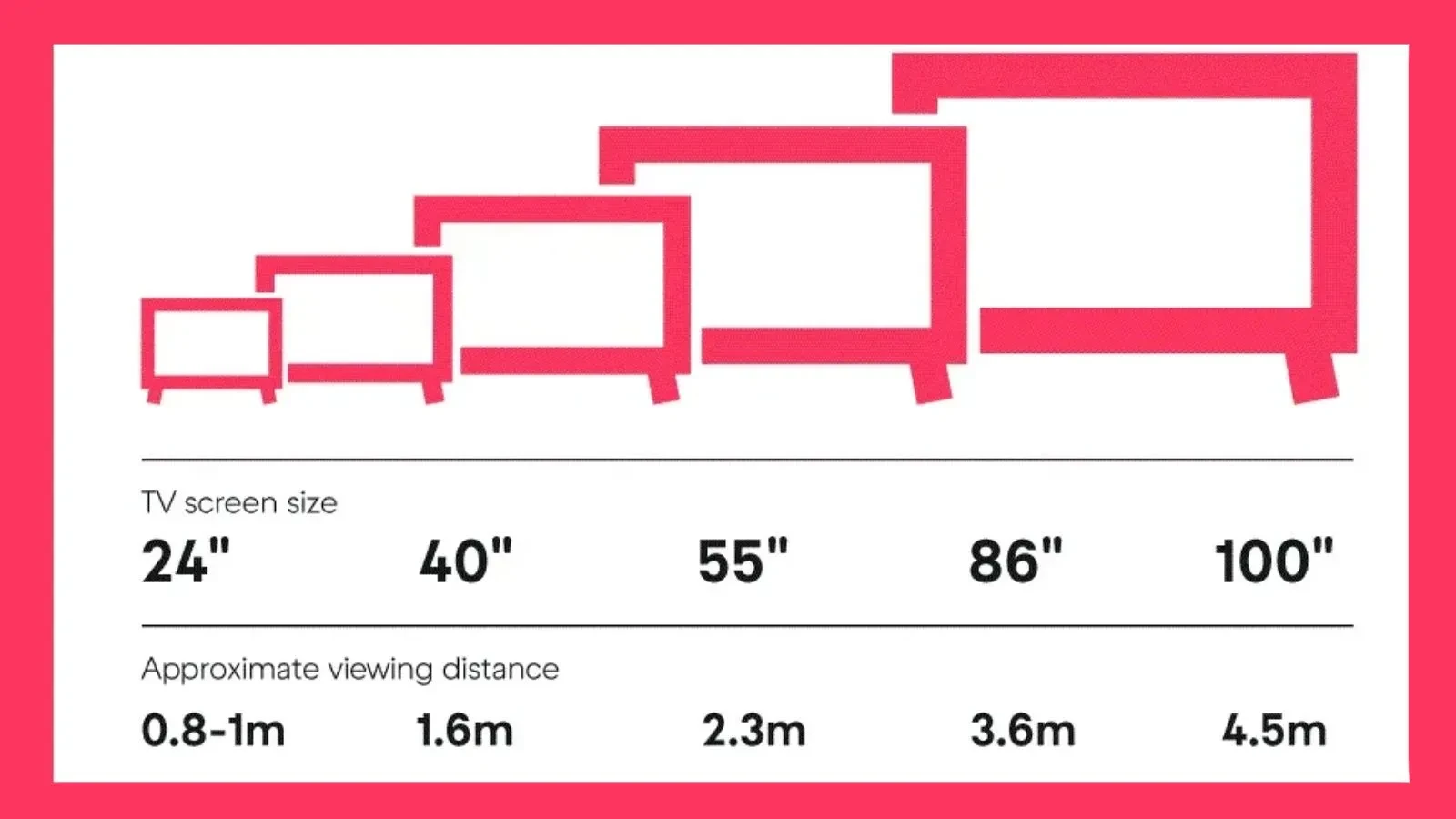
Before you buy, it helps to picture your TV in its new home. Different spaces call for different sizes.
Bigger doesn’t always mean better. Nobody wants a cinema screen in their kitchen! It all depends on the room the TV is going in, and how far away you’ll sit from it.
- 24–32 inches: Compact and versatile, great for kitchens, small bedrooms, or student flats.
- 40–50 inches: A solid mid-range, balancing price and performance.
- 55 inches and up: Perfect for main living spaces, for sports fans and film lovers who want that cinematic feel.
As a rule of thumb: the further away you sit, the bigger the screen you’ll want.
Why not look at our guide to small screens that are big on features?
Step 3: Understand TV specs
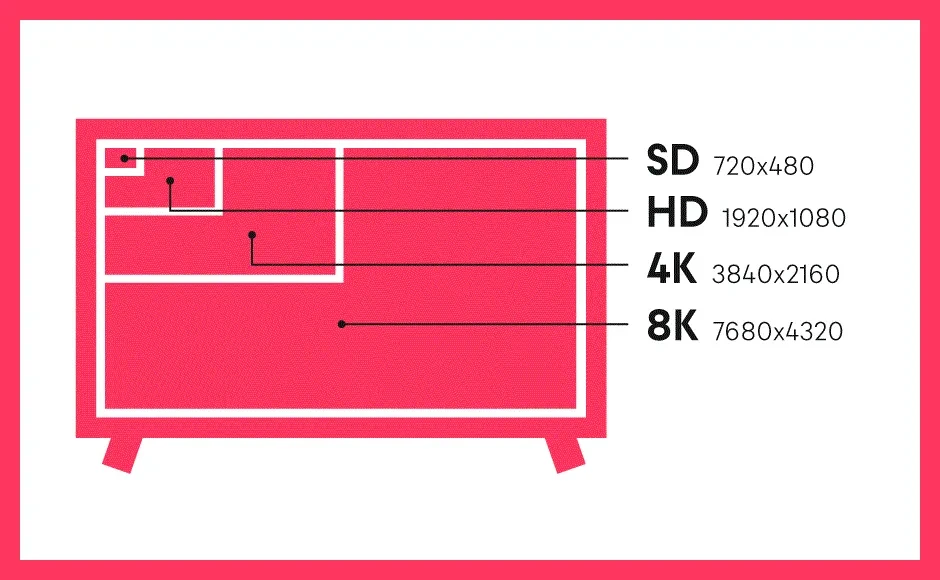
This is what can make two TVs of the same size look quite different. The main specifications to look out for are:
Resolution (HD, Full HD, 4K, 8K): More pixels = sharper, more detailed picture, especially important on larger screens.
Screen type (LED, OLED, QLED and Mini LED):
Different display technology has different benefits, depending on what you usually watch on your telly. Our TV tech guide goes over each one and its benefits.
Refresh rate: 60Hz is fine for everyday viewing, but higher rates (like 120Hz) make fast action like sports or gaming much smoother.
Smart features: voice control, screen casting and the ability to download apps can all help you enjoy your new TV.
Want to dive deeper? Check out our guide to TV specifications.
Step 4: Check Freely is built-in
No matter which TV you choose, if it has Freely built-in you’ll unlock:
- Live TV over Wi-Fi, no need for an aerial or dish
- 97% of the UK’s most watched shows, all in one place (source: BARB Jan-Jun 2026)
- MiniGuide for quick channel switching
- Pause, restart, and catch up with ease
- No contract or subscription needed. You’ll just need a TV Licence and an internet connection.
Whether you’re looking for a big screen for movie nights, something smaller for the bedroom, or a budget-friendly screen for the kids’ playroom, there’s a Freely TV made for you.
Buying a TV doesn’t have to be confusing. The wide choice can feel daunting, but it really comes down to how you watch and what matters most to you.
Explore our full range of Freely televisions